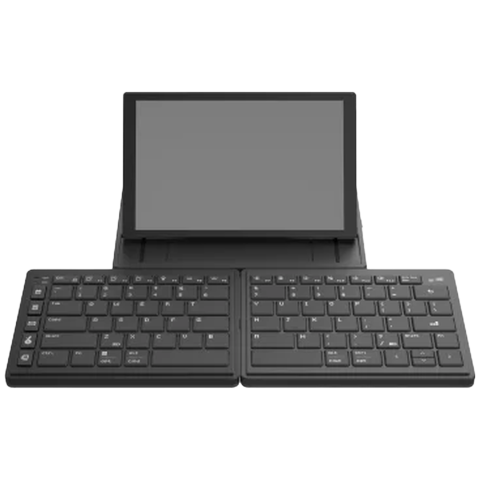
Mobile Pixels Tetra Keyboard 8" Bekabeld En Draadloos Toetsenbord Zwart
Beste deal
 |
Mediamarkt.nl | 299,00 | Bekijk |
Prijzen Mobile Pixels Tetra Keyboard 8" Bekabeld En Draadloos Toetsenbord Zwart
| Winkel | Prijs | Verzendkosten | Totaal | Verzenddagen | Beschikbaar | Conditie | ||
|---|---|---|---|---|---|---|---|---|
| |
Mediamarkt.nl | 299,00 | Gratis | € 299,00 | Op voorraad | Nieuw | Bespaar nuBestel nu | |
 |
Vergelijkeven.nl | 356,79 | Gratis | € 356,79 | Op voorraad | Nieuw | Kopen |
Prijshistorie
Ontvang een prijsmelding
Product informatie
Split. Touch. Type.
Experience natural posture, enhanced productivity, and seamless connectivity, all in one meticulously crafted keyboard.
Split Mode
Split mode for ultimate freedom. You can separate the two key modules. Increasing the space between your left and right hands while typing. This enables you to type with your hands comfortably at shoulder width apart and with wrists straight to avoid ulnar deviation.
Splice Mode
When all three components attached together magnetically in a linear format, you’ve got a comfortable split keyboard with a 8" multi-touch display in the middle. The screen functions as an extra display or a shortcut center. The keyboards get spaced out on the left and right, allowing you to type comfortably.
Stacked Mode
Stacked mode for a traditional feel. Just the two keyboard halves can be attached to each other magnetically, creating a compact typing device, while the screen exists independently.
Game Mode
Full-size keyboards force gamers to reach around the keyboard to grip the mouse. This posture puts excessive strain on your wrist, elbow and shoulder. The Tetra keyboard lets you move the right half of the keyboard out of the way so you can position your mouse inside of your right shoulder for more comfort, precision, and dexterity.
Your Secondary Display.
The 8-inch multi-touch display (1280 × 800 pixels, 16:10 aspect ratio) is perfect for keeping commonly used, but infrequently accessed windows up without having to find it, such as calendars, music players, chat messages, or notes.
Unleashes Your Productivity.
Create and switch between custom workspaces, select and customize each function, jump between software, and more like never before.
Total Control at Your Fingertips.
The Tetra Board App allows you to use the 8-inch touchscreen as a control dashboard. The touchscreen maps almost any application for actions and adjustments, such as creating macros, shortcuts, launching Apps, tools, opening files and folders, and more.
Fully Customizable.
Simply select actions onto keys, and assign ready-made icons or use your own. For easy visual navigation, you can customize their colors, sizes and more. Each board can be assigned up to 32 keys.
Tetra On the Go.
You can nicely tuck the keyboard away in your backpack because the keyboard is split. The two halves actually magnetize together when you stack the backside to each other.
